Amy vs MyFitnessPal (2026): Which Calorie Tracker Fits You?
Compare Amy and MyFitnessPal on logging style, price, platforms, AI tools, integrations, and accuracy. Plus alternatives for free and micronutrient tracking.

Chris Raroque
Updated

Amy and MyFitnessPal now share more features than their marketing suggests. Both can log calories and macros. Both support camera input. Both have voice workflows. Both can scan a barcode.
The decision comes down to what each app treats as the center of the product.
MyFitnessPal is a broad nutrition and fitness platform built around a large food database. Amy is a focused Apple food journal built around describing the meal in normal language and reviewing a fresh nutrition search.
If you want Android, web access, a permanent free diary, saved recipes, community, meal planning, and dozens of fitness integrations, choose MyFitnessPal.
If you have an Apple device and the search-select-adjust loop is the reason you stop tracking, try Amy on the meals that normally create that friction.
Quick comparison
| Feature | MyFitnessPal | Amy Food Journal |
|---|---|---|
| Default logging style | Database search and saved foods | Plain-language text journal |
| AI-assisted input | Meal Scan and Voice Logging with Premium | Text, camera, and Watch voice workflows |
| Nutrition lookup | 20.5M+ food database advertised in US listing | Fresh web nutrition search for the meal description |
| Free plan | Yes, for ordinary food and exercise logging | Three-day trial only |
| US monthly price | Premium: $19.99 | $9.99 |
| US annual price | Premium: $79.99 | $99.99 |
| Platforms | iOS, Android, web, Apple Watch, Wear OS | iPhone, iPad, Mac, Apple Watch, Apple Vision |
| Integrations | 40+ fitness apps and devices | Apple Health-focused |
| Meal planning | Premium+ | No full meal-planning system |
| Micronutrients | Broader than Amy, with Premium controls | Focused on calories and macros |
| Best fit | One account for a broad fitness ecosystem | A smaller text-first daily log |
Prices and features were checked against the current MyFitnessPal support pages and US App Store listings for both apps on September 19, 2026. Feature availability can vary by country, language, device, and rollout.
The logging difference
Imagine lunch was half a chicken shawarma plate, extra garlic sauce, most of the rice, a few fries, and no pita.
In MyFitnessPal, you can search individual foods, use a saved restaurant meal, speak the ingredients with Voice Logging, or start from Meal Scan. Voice and camera are Premium features. The result is a set of editable database entries.
In Amy, you type the sentence as you remember it. The app runs a current nutrition search, returns a calorie-and-macro estimate with source context, and lets you change the interpretation or amounts. Camera and barcode input are there when the meal is more naturally captured that way.
Neither approach measures the plate. Garlic sauce, oil, and the amount of rice still create uncertainty. The distinction is where the first draft comes from: database selection in a larger platform, or a natural-language description in a focused journal.
For packaged food with a clear barcode, MyFitnessPal Premium may be every bit as convenient. For a saved breakfast you have logged for years, MyFitnessPal may be faster because the work is already done. Amy’s advantage is largest on mixed, modified, homemade, or local restaurant meals that are easier to describe than reconstruct.
Price: free matters, and annual price reverses the story
MyFitnessPal’s ordinary diary is free. Its current official plan table includes food and exercise logging, macros, recipes, measurements, partner connections, diary sharing, and printable reports for free users.
Premium costs $19.99 per month or $79.99 per year in the US. It adds Barcode Scanner, Meal Scan, Voice Logging, ad-free use, data export, gram-based macro goals, timestamps, fasting, and deeper dashboards. Premium+ adds meal-plan and grocery tools.
Amy gives new users a three-day trial, then costs $9.99 per month or $99.99 per year. It is cheaper month to month and more expensive annually than MyFitnessPal Premium.
That makes price a question of fit:
- Choose free MyFitnessPal if the basic diary works for you.
- Choose annual MyFitnessPal Premium if you use its ecosystem and several paid tools.
- Choose Amy if the text-first workflow changes whether you actually complete the log.
Do not pay for Amy because it is newer. Pay only if a smaller interaction solves the habit problem better.
MyFitnessPal wins on breadth
Platforms and integrations
MyFitnessPal connects to more than 40 fitness apps and devices, according to its current App Store listing. It works across iPhone, Android, the web, Apple Watch, and Wear OS.
Amy is deliberately narrower. It supports current Apple platforms and centers Apple Health. There is no Android app or conventional browser diary. If your scale, watch, coach, and training apps already revolve around MyFitnessPal, that network can outweigh a nicer input field.
History, recipes, and community
Years of saved meals and recipes are a real switching cost. MyFitnessPal also has diary sharing, community features, recipe tools, and a much larger installed base.
Amy does not try to replace those social and planning layers. It is closer to a personal journal with automated nutrition lookup.
A free starting point
MyFitnessPal’s free diary is capable enough to learn whether calorie tracking helps you. Barcode, camera, and voice require Premium, but search and ordinary logging do not.
If the goal is spending nothing, our free calorie tracking guide also compares Cronometer, Foodnoms, FatSecret, Lose It, and newer options. Amy should not win a free-app comparison because it is not free after the trial.
Amy wins when the journal itself needs to feel smaller
Text is the home screen, not an extra tool
MyFitnessPal has Voice Logging, but it is one Premium workflow in a larger application. Amy is designed around the idea that the meal can start as an ordinary sentence.
That difference shows up before the nutrition result. You are not first deciding which logging tool to open, which meal bucket to enter, or which database result looks closest. You write the meal, then review what Amy found.
Current search helps with the long tail
A static database is excellent when the exact product or chain item exists. It is less helpful for a new menu, a local cafe, a seasonal product, or a detailed restaurant modification.
Amy’s search-based workflow can look for current public nutrition sources tied to the description. That does not guarantee a perfect answer. It gives the system a chance to use current evidence and show an editable draft instead of forcing the user to settle for the nearest old entry.
The interface stays focused
Amy does not include MyFitnessPal’s community, broad meal-planning system, partner ecosystem, or full web experience. That is a weakness for some people and the point for others.
If the only job is “record what I ate and see the calories and macros,” fewer layers can make the product easier to return to.
Keep your regular meals close
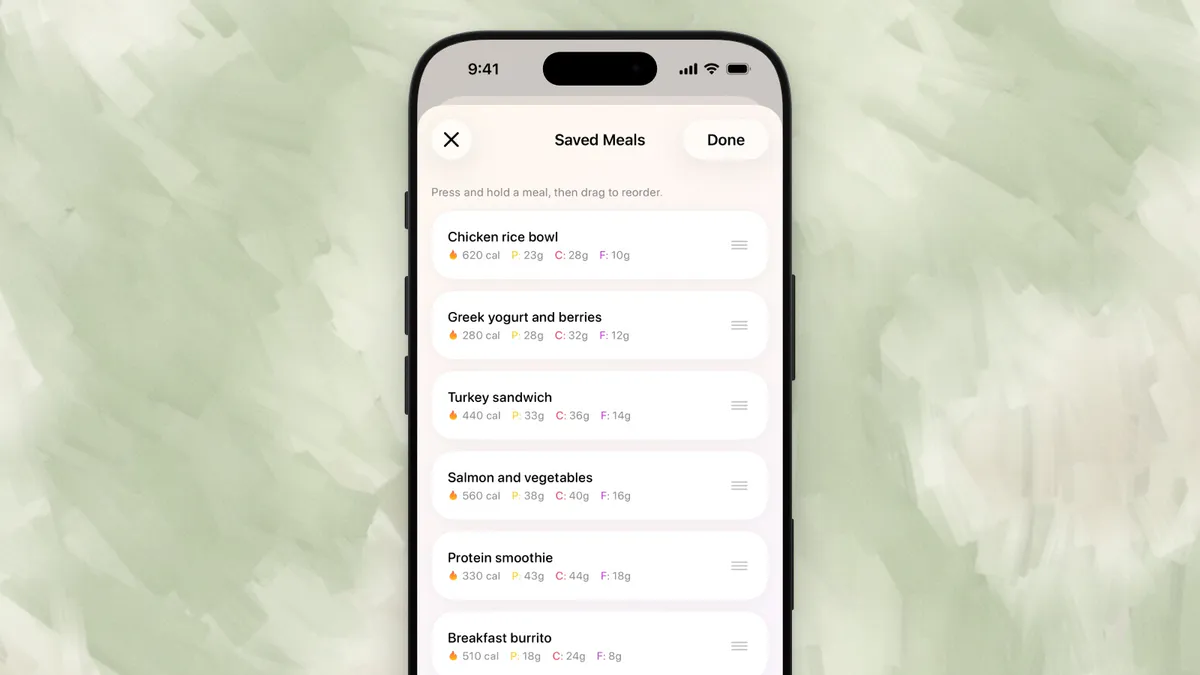
You do not need to describe the same breakfast from scratch every morning. Amy’s Saved Meals lets you keep repeat meals together and arrange them in your own order.
Which app is more accurate?
There is no defensible one-number winner.
MyFitnessPal can be very accurate for a correct packaged-food record, official restaurant item, or saved recipe with known amounts. Its database breadth also creates similar-looking entries with different servings and sources.
Amy can find current nutrition information for a specific description and expose a result the user can correct. It still has to estimate portions and hidden ingredients when they are not supplied.
The best workflow for either app is:
- Give the exact brand or restaurant when it matters.
- Include the amount and cooking method you know.
- Check the ingredient that can move the total most.
- Save repeated meals so you do not solve them again.
- Use a range when the meal does not support a precise number.
Read why calorie apps disagree for the source and serving checks, or how accurate AI calorie counting is for photo and portion limits.
A fair three-meal test
Do not compare the apps with three easy barcodes. Use three meals that reveal the workflow:
- A packaged snack. MyFitnessPal Premium’s barcode and Amy’s barcode should both make sense.
- A mixed homemade meal. Try MyFitnessPal Voice Log or search, then type the same description into Amy.
- A local restaurant modification. Include what changed, then inspect the entries, sources, and portions in both apps.
Notice four things: how long you postpone starting, how many decisions you make, whether the result is easy to correct, and whether you would repeat that workflow tomorrow.
That test is more useful than a stopwatch claim because it uses your food, your history, and your tolerance for detail.
Better alternatives for specific jobs
Amy is not the only alternative to MyFitnessPal.
Cronometer for micronutrients
Cronometer tracks far more nutrient detail, uses a curated food-record approach, keeps barcode scanning free, and offers Photo and Voice Log in Gold. It is the strongest option when vitamins and minerals matter more than a minimal diary.
MacroFactor for adaptive coaching
MacroFactor uses consistent intake and weight data to estimate expenditure and recommend target adjustments. It now supports typed Describe and AI Photo & Text logging. Choose it when the output should change a structured cut, maintenance phase, or gain phase.
Lose It for a familiar traditional tracker
Lose It offers a polished database-first diary and a permanent free option. It can be an easier transition for someone who likes MyFitnessPal’s general model but wants a different interface.
Foodnoms for an Apple-first free tier
Foodnoms offers a focused Apple experience with a free plan and optional upgrade. It is a useful middle ground when Apple integration and price matter more than live nutrition search.
The final decision
Choose MyFitnessPal if its ecosystem is part of the value: free basic logging, Android and web access, recipes, community, meal planning, and broad device connections.
Choose Amy if your real failure point is the daily translation from “I ate this” into a structured log. The three-day trial is long enough to test input friction, not long-term results. Use it on the meals you normally skip. If the journal becomes easier to complete, Amy has earned the subscription. If it does not, keep the broader or free option.
Frequently asked questions
Is Amy cheaper than MyFitnessPal?
Amy is cheaper monthly at $9.99 versus MyFitnessPal Premium at $19.99. Amy is more expensive annually at $99.99 versus MyFitnessPal Premium at $79.99. MyFitnessPal also has a permanent free diary; Amy has a three-day trial.
Does MyFitnessPal still log food for free?
Yes. Food and exercise logging, macro viewing, recipes, diary sharing, partner links, and several other basics remain free. Barcode scanning, Meal Scan, Voice Logging, ad-free use, and deeper controls require Premium.
Does Amy have a barcode scanner and camera logging?
Yes. Amy supports barcode and camera input in addition to plain-language text. Its defining difference is that text remains the default journal workflow.
Can Amy replace MyFitnessPal on Android?
No. Amy is currently an Apple-platform app. Android users should use MyFitnessPal, Cronometer, MacroFactor, Lose It, or another cross-platform tracker.
Which is better for restaurant meals?
MyFitnessPal is strong when the exact chain item exists in its database. Amy is useful for local restaurants and modifications because the user can describe the full meal and trigger a current nutrition search. Neither app can see hidden oil or measure an unknown portion, so review the result.
Which is better for macros?
Both can track protein, carbohydrates, and fat. MyFitnessPal offers broader goal controls and ecosystem features. Amy offers a smaller text-first log. For adaptive targets and detailed coaching, MacroFactor is the stronger specialist.
This comparison was fact-checked against first-party MyFitnessPal, Amy, and Apple pages on September 19, 2026. It is general product information, not medical or nutrition advice.
Keep Reading
All articlesComparisons
Lose It vs MyFitnessPal vs Amy — 2026 Comparison
Lose It vs MyFitnessPal vs Amy Food Journal compared on speed, accuracy, pricing, and features. See which calorie tracker wins.
Comparisons
7 Best Noom Alternatives for Calorie Tracking (2026)
Noom costs $59/mo. These 7 alternatives are cheaper, simpler, and skip the coaching. Honest comparison with pricing and features.
Guides
Why People Quit MyFitnessPal (And What To Use Instead)
MyFitnessPal is still powerful, but many people leave because daily logging feels heavy. Here is what breaks down, what to try instead, and when to keep using it.
Comparisons
Amy vs Cronometer (2026): Fast Logging or Deep Nutrition?
Compare Amy and Cronometer on text, photo and voice logging, micronutrients, verified foods, pricing, platforms, and which daily workflow fits you.