MacroFactor Review (2026): Excellent Coaching, Serious Commitment
A current MacroFactor review covering adaptive expenditure, AI photo and text logging, pricing, the seven-day trial, and who benefits from its coaching.

Chris Raroque
Updated
MacroFactor is easy to recommend to the right person and easy to over-recommend to everyone else.
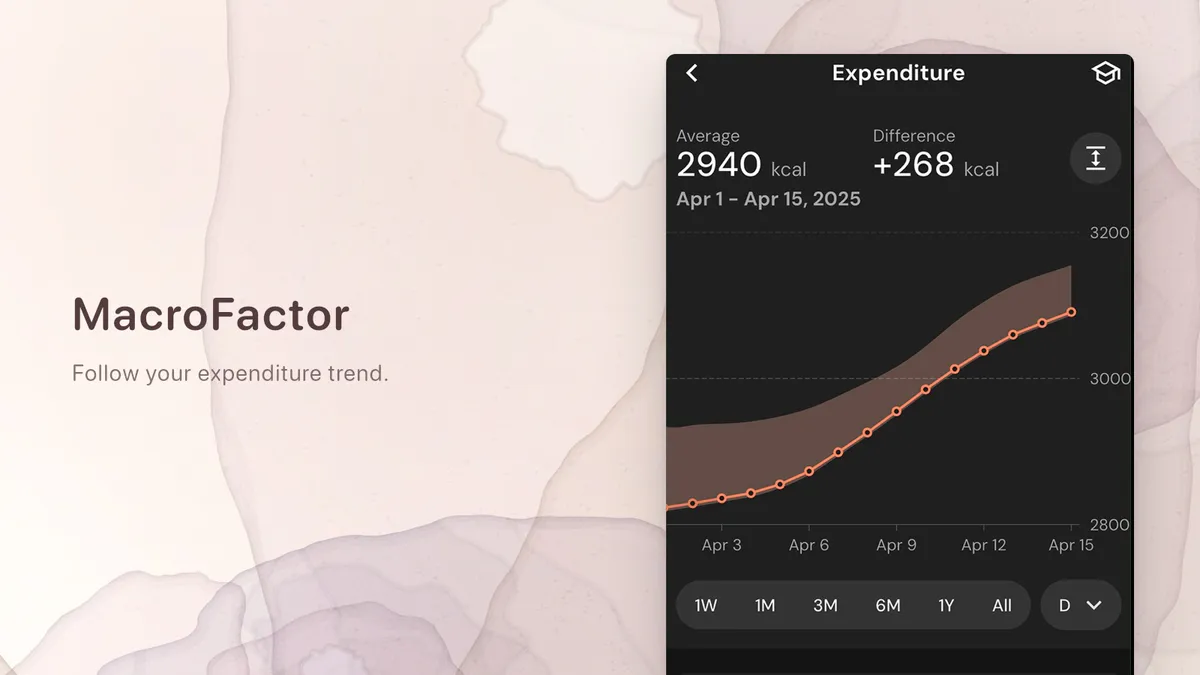
Its defining feature is not a prettier food diary. MacroFactor estimates energy expenditure from logged intake and weight trend, then uses that estimate during weekly check-ins to recommend calorie and macro changes. The app is designed for someone who wants the log to change tomorrow’s plan.
The current product also offers more logging methods than older reviews describe. MacroFactor now has Describe for spoken or typed meals, plus AI Food Logging with Photo, Photo & Text, and image upload. A review that says it has no photo or AI logging is out of date.
The tradeoff is commitment. The coaching works from the data you supply. MacroFactor says continuous updates require nutrition logging at least six of seven days and weight at least once per week, with daily entries preferred. If you want an app that asks little of you, that requirement may matter more than any feature list.
The short verdict
MacroFactor is a strong paid nutrition coach for people willing to log consistently enough for adaptive targets to become useful. It is not the obvious choice for a person who only wants occasional calorie awareness.
The current US price is $11.99 per month, $47.99 for six months, or $71.99 per year, with a seven-day trial and no permanent free tier. MacroFactor also offers an $89.99 annual bundle with its separate Workouts app. Those prices come from the current subscription documentation.
Choose MacroFactor if you are cutting, maintaining, or gaining on purpose and want your calorie target to respond to your real trend. Choose something simpler if you are still trying to make food logging happen at all.
What MacroFactor is actually doing
A standard calorie calculator estimates a target from age, sex, height, weight, and activity. That number is a starting point. MacroFactor tries to replace the static estimate with an observed one.
The app combines:
- Logged calorie intake.
- Scale weight and a smoothed weight trend.
- A goal and desired rate of change.
- An expenditure model that updates as the data changes.
- A weekly check-in that proposes new calorie and macro targets.
MacroFactor says it usually takes about two to three weeks to settle on a useful initial expenditure estimate when the data is consistent. Missing intake or weight data can put the estimate into a holding state rather than forcing an update from weak evidence. That restraint is part of the design, not a failure.
The app offers Coached, Collaborative, and Manual program styles. Coached lets the system set and adjust the program. Collaborative keeps the weekly calorie guidance while letting the user shape day-to-day macro targets. Manual leaves targets to the user while retaining the logger and analytics.
This is the reason MacroFactor feels different from MyFitnessPal, Cronometer, or Amy. The diary is not only a record. It is an input to a feedback loop.
Logging is no longer search-only
MacroFactor still has traditional search, barcode scanning, saved foods, recipes, quick add, and a timeline-style diary. It now adds two separate AI paths.
Describe
Describe accepts typed or dictated meal contents and returns editable common-food records. MacroFactor says it is best for generic foods, quantities, and meals without available nutrition information. It is not intended to find a specific branded item; standard search or a barcode remains better for that.
That boundary is useful. “One cup of tomato sauce” is a good Describe input. A specific packaged sauce is a barcode problem. A restaurant meal with a posted calorie total can be described with that total to create a rough macro and micronutrient allocation.
AI Food Logging
MacroFactor’s current AI Food Logging guide supports a live photo, Photo & Text, or an uploaded image. It identifies foods, estimates servings, and puts editable entries on a plate before logging.
The documentation itself recommends good lighting, visible ingredients, a top-down angle, a common size reference, and a scale in view when possible. That is a sensible reminder of what the camera cannot know. The image is a starting point, not ground truth.
The Photo & Text option is particularly useful for a mixed meal because words can supply hidden ingredients and preparation details. Our guide to text versus photo tracking explains why those inputs solve different parts of the problem.
What MacroFactor does especially well
It separates adherence from judgment
MacroFactor’s coaching does not punish a user for missing a target. It uses what was logged to update the model and recommends a change based on the goal and trend. The interface is designed to avoid red-number shame when someone eats above a target.
That is a meaningful product decision. A tracker can ask for consistent data without pretending moral perfection is part of the algorithm.
The expenditure view answers a real question
People often respond to a noisy scale by changing calories too quickly. MacroFactor smooths weight trend and compares it with intake over time. The goal is to show whether the plan is producing the expected rate of change before a weekly adjustment is accepted.
It does not measure metabolism directly. It infers expenditure from the relationship between energy intake and weight trend. The result is only as useful as the consistency and honesty of the inputs, but it is more personal than repeating the same static calculator result for months.
The program can grow with an experienced user
Coached mode gives a clear starting structure. Collaborative mode supports different training-day targets. Manual mode works for someone following a coach’s plan but wanting MacroFactor’s diary, trend weight, and expenditure analysis.
That range is why the app fits serious training better than a journal focused only on recording meals.
Where MacroFactor asks a lot
Consistent data is part of the price
The subscription price is visible. The data requirement is the less obvious cost.
If you log Monday through Thursday, disappear on the weekend, and weigh sporadically, the app cannot separate a changing metabolism from missing intake. MacroFactor says continuous updates require food logs on six of seven days and at least one weight per week. Daily weight is preferred because more observations make the trend less sensitive to one noisy measurement.
For an experienced tracker, that is reasonable. For someone who already quits trackers after three days, it can be the wrong starting product.
The dashboard can become the hobby
Expenditure, trend weight, change rate, energy balance, habits, fasting, micronutrients, period tracking, and program controls can be motivating. They can also turn eating into constant analysis.
The app deserves credit for its neutral visual language, but a neutral chart is still a chart. If numbers make you anxious or rigid, use fewer views, choose Manual mode, or stop tracking and talk with a qualified professional. Our beginner calorie-counting guide includes a lower-pressure way to start.
AI input does not remove portion uncertainty
Photo logging can identify a food and still miss the amount. Describe can understand the meal and still choose a generic record that differs from the recipe. A coached target does not make the incoming food number more certain.
Review the items that can move the total most: fats, sauces, calorie-dense toppings, large starch portions, and branded products. The research behind those limits is covered in how accurate AI calorie counting is.
MacroFactor vs Amy Food Journal
MacroFactor and Amy both accept ordinary language. That is no longer the dividing line.
| If you care most about… | Better fit | Why |
|---|---|---|
| Adaptive calorie and macro targets | MacroFactor | Coaching is the core product |
| Trend weight and inferred expenditure | MacroFactor | Amy does not build an adaptive program |
| Android support | MacroFactor | Amy is Apple-first |
| Paying less per year | MacroFactor | $71.99 annually versus Amy at $99.99 |
| A fresh search for a specific restaurant or unusual meal | Amy | The meal description drives a current web nutrition search |
| A calmer note-like daily log | Amy | It keeps the job focused on recording and reviewing the meal |
Amy has a three-day trial rather than MacroFactor’s seven-day trial. It tracks calories and macros, supports camera and barcode input, connects with Apple Health, and now supports voice logging on Apple Watch. It does not offer MacroFactor’s expenditure model, coached programs, Android app, or analytics depth.
The honest conversion test is about intent. If you want the app to decide how your targets should change, MacroFactor earns its complexity and lower annual price. If you already know roughly what you are tracking and want the smallest path from “I ate this” to an editable calorie-and-macro record, Amy may fit better.
Do not compare them with a single packaged snack. Use a meal that reflects your life. In MacroFactor, try Describe or Photo & Text and look at the plate results. In Amy, type the same description and inspect the search-backed estimate. The workflow you are willing to repeat matters more than a feature-grid winner.
Who should use MacroFactor?
MacroFactor is a good fit for:
- Lifters running a structured cut, maintenance phase, or gain phase.
- People who already log food most days.
- Users who want weekly target adjustments without hiring a coach.
- Data-oriented people who understand that expenditure is an estimate.
- Anyone who prefers a nonjudgmental coached program.
- Users who need both iPhone and Android support.
It is a weaker fit for:
- Someone seeking a permanent free tracker.
- A casual user logging only a few days per week.
- A person whose main obstacle is opening a complex nutrition dashboard.
- Anyone who needs professional medical nutrition care rather than a consumer algorithm.
Is MacroFactor worth the money?
MacroFactor is worth $71.99 per year when you use the feedback loop. Consistent logs feed the expenditure estimate; the estimate informs the weekly check-in; the check-in changes a program you are actively following.
It is expensive as a basic food diary and inexpensive compared with personalized human coaching. Which comparison is fair depends on how you use it.
Take the seven-day trial seriously, but do not expect the expenditure model to know you in a week. Judge the logger, program setup, and interface during the trial. Judge adaptive expenditure only after enough consistent data exists.
Frequently asked questions
Does MacroFactor have a free version?
No. MacroFactor offers a seven-day trial, then requires a subscription. Current US pricing is $11.99 monthly, $47.99 for six months, or $71.99 annually.
Does MacroFactor have AI photo logging?
Yes. AI Food Logging accepts a live photo, Photo & Text, or an uploaded image. It returns editable food and serving estimates before they are logged.
Can I type a meal into MacroFactor?
Yes. Describe accepts typed or dictated meal descriptions and matches them to common foods. It is designed for generic foods and quantities, not exact branded-product search.
How long does MacroFactor take to estimate expenditure?
MacroFactor says it generally takes about two to three weeks of consistent data to establish a useful initial expenditure estimate. Continuous updates require nutrition logs at least six of seven days and weight at least once per week.
Is MacroFactor better than MyFitnessPal?
MacroFactor is better for adaptive coaching, trend weight, and a neutral paid experience. MyFitnessPal is better for a permanent free diary, broader community and integration features, and conventional web access. The right choice depends on whether you want coaching or a general platform.
Is MacroFactor better than Amy?
MacroFactor is better for coached targets, expenditure analysis, Android, and annual price. Amy is better for an Apple user who wants a focused text-first journal using current nutrition search rather than a full coaching system.
Product capabilities, prices, and platform details were checked against first-party MacroFactor and Apple pages on September 19, 2026.
Header image: a crop from the official US App Store listing, retrieved September 19, 2026.
Keep Reading
All articlesReviews
Best Calorie Tracker App in 2026: What Actually Matters
The best calorie tracker app depends on the logging habit you can keep. Compare Amy, MyFitnessPal, Cronometer, Lose It, MacroFactor, Cal AI, Foodnoms, and more.
Reviews
Best Free Calorie Counter Apps for iPhone
Compare the best free calorie counter apps for iPhone by logging style, free-tier limits, Apple fit, and when a paid text-first tracker is worth it.
Reviews
Cronometer Review (2026): Micronutrients, Pricing, and Who Needs It
A current Cronometer review covering its free plan, Gold pricing, 95 nutrients, verified food database, photo and voice logging, and best use cases.
Reviews
Lose It! App Review: Still Worth It? (2026)
Honest Lose It! app review covering features, pricing, free vs premium, and how it compares to MyFitnessPal and newer alternatives.