Cronometer Review (2026): Micronutrients, Pricing, and Who Needs It
A current Cronometer review covering its free plan, Gold pricing, 95 nutrients, verified food database, photo and voice logging, and best use cases.

Chris Raroque
Updated
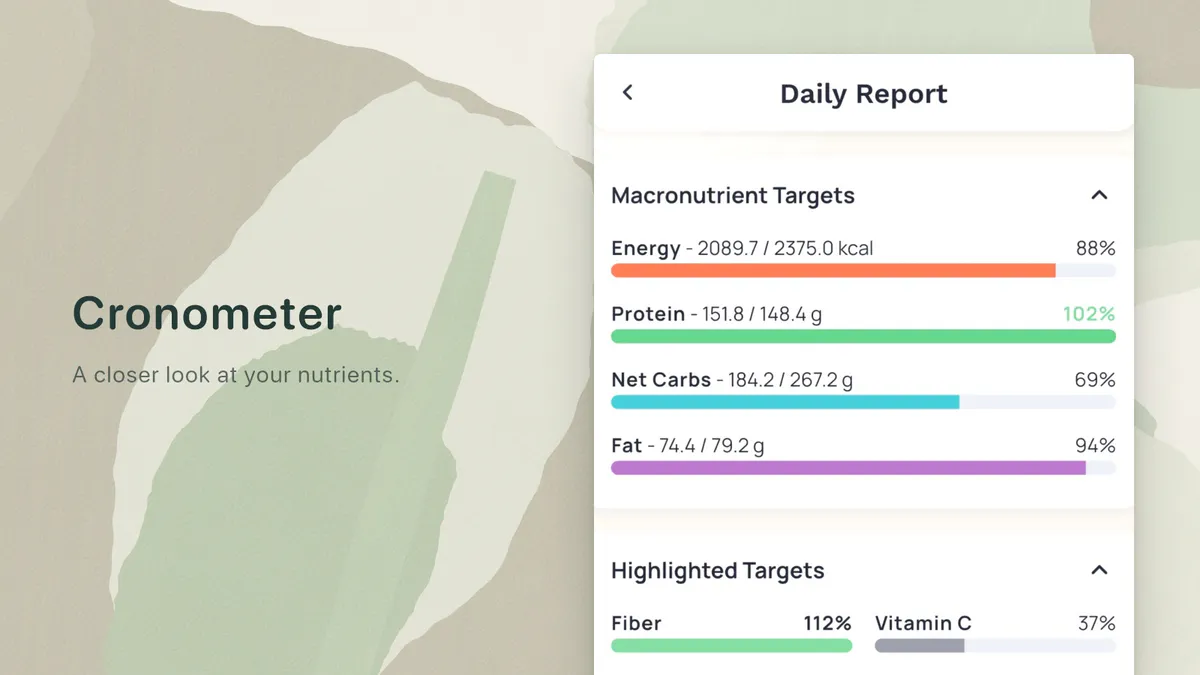
Cronometer makes the most sense when “calorie tracker” is too small a description for what you need. Its current US App Store listing advertises more than 1.1 million verified foods and up to 95 nutrients and other compounds, with a free barcode scanner and integrations spanning Apple Health, Fitbit, Garmin, Oura, Whoop, and others.
The old criticism that Cronometer has no modern input tools is no longer true. Cronometer Gold now includes Photo Log and Voice Log. The app remains built around detailed nutrient records, but it is not frozen in database search.
That changes the review. Cronometer is not merely the app for people willing to tolerate slow logging in exchange for better data. It is a mature nutrition platform with several ways to enter food. The reason to choose it is still depth: you want to inspect iron, B12, calcium, amino acids, fatty acids, fiber, and dozens of other targets, not only the calorie total.
The short verdict
Cronometer is the strongest mainstream choice for people who need nutrient detail they can trace back to curated food records. Its free plan is useful, and the current Gold price is $10.99 per month or $59.99 per year in the US App Store.
Choose the free plan if you want calories, macros, micronutrients, barcode scanning, custom foods and recipes, device sync, and shorter reports without paying.
Choose Gold if you will use Photo Log, Voice Log, longer-range charts, fasting, recipe import, repeat items, custom diary groups, scheduling, and the ad-free experience.
Choose a simpler app if the charts and nutrient targets create more work than insight. A tracker can be excellent and still be the wrong amount of product for your daily job.
What Cronometer includes now
| Area | Free | Gold |
|---|---|---|
| Food diary | Yes | Yes |
| Calories, macros, and micronutrients | Yes | Yes |
| Barcode scanner | Yes | Yes |
| Verified or lab-analyzed food database | Yes | Yes |
| Custom foods, meals, and recipes | Yes | Yes |
| Device and health integrations | Yes | Yes |
| Photo Log and Voice Log | No | Yes |
| Recipe Importer, Repeat Items, scheduling | No | Yes |
| Long-range charts, more insights, ad-free use | No | Yes |
Cronometer’s current Gold page lists both plan boundaries and the newer input tools. Its US App Store listing shows Gold at $10.99 monthly or $59.99 annually. I checked those first-party pages for this update on September 19, 2026. I did not run a new long-term paid test, so observations below are based on the documented product and the visible current interface rather than invented hands-on results.
Why people choose Cronometer
The nutrient record is the product
Most calorie trackers treat micronutrients as an extra report. Cronometer makes them part of the diary. A food entry can show not just calories, protein, carbs, and fat, but vitamins, minerals, amino acids, fatty acids, caffeine, alcohol, and other compounds when the source record contains them.
This matters when the question is specific:
- Is a plant-based diet consistently supplying B12 and iron?
- Is sodium unusually high across the week?
- Is a restrictive diet creating obvious nutrient gaps?
- Does a dietitian need a report that goes beyond calories?
- Are protein targets being met without ignoring fiber and micronutrients?
It does not make Cronometer a medical device, and more displayed numbers do not remove food-measurement error. It does make the app better suited to nutrient questions than a tracker designed around four headline macros.
The food database favors traceability
Cronometer distinguishes curated, verified, and user-created records more deliberately than apps built around the largest possible search index. The current product advertises over 1.1 million verified foods, including analyzed entries.
That does not mean every search result is perfect. Branded labels change, restaurant recipes change, and even a correct per-100-gram record can produce a bad total when the amount is wrong. But a clearly identified USDA or NCCDB-style source is easier to audit than a mystery entry with an implausible serving.
When calorie totals disagree, our app discrepancy guide explains how to compare source, food state, serving unit, and grams before changing your log.
The free plan is genuinely useful
Cronometer does not reserve the basic nutrition diary for paying users. Free users can log food, scan barcodes, track nutrient targets, create custom foods and recipes, sync supported services, and generate reports within a seven-day window. Ads and some organization limits remain, but the core job is intact.
For someone whose first requirement is “I need a permanent free calorie tracker,” Cronometer deserves to be compared with the other current free tracking apps before any paid recommendation.
Photo and voice are real additions, with normal AI limits
Gold users can photograph a meal and let Cronometer identify likely ingredients and servings, or speak ingredients through Voice Log and Siri. Those tools reduce the amount of searching, especially when the plate is visually clear or the ingredients are easy to name.
They do not turn a picture into a measurement. Oil, sauce, mixed recipes, and portion depth remain difficult. Cronometer’s own Gold copy describes the output as identified ingredients and servings, which is a useful draft to inspect. Our research review on AI calorie-counting accuracy explains why editing still matters.
Where Cronometer can be too much
The interface exposes many decisions
The same detail that makes Cronometer valuable can make a simple lunch feel like a small data project. A user may choose the food source, amount, serving unit, diary group, time, recipe, and nutrient view before the log feels finished.
For someone actively managing a nutrient problem, those decisions have a purpose. For someone who only wants a useful calorie trend, they may be friction without a payoff.
This is why “easiest” cannot be answered by counting features. The easiest calorie tracker is the one whose default input matches your meals and whose output answers the question you actually have.
Gold is most valuable after the free plan proves useful
Photo Log and Voice Log are appealing, but they are not enough reason by themselves to subscribe. Use the free diary for a week. If you regularly inspect micronutrients and wish the entry step were faster, Gold solves a real problem. If you ignore the nutrient report and only want an easier text box, paying for more Cronometer may not change the habit.
Detailed numbers can imply more certainty than the meal deserves
A result can show 95 nutrient fields while the user guessed the portion or picked the wrong preparation. Precision in the interface is not the same as precision in the input.
Packaged food with a correct label is one situation. A restaurant curry with unknown oil is another. The honest tracker keeps those confidence levels separate instead of treating every populated field as equally measured.
Cronometer vs Amy Food Journal
Cronometer and Amy now overlap more than old comparisons admit. Both can reduce manual search. The distinction is what happens after the input.
| If you care most about… | Better fit | Why |
|---|---|---|
| Vitamins, minerals, amino acids, and detailed reports | Cronometer | Nutrient depth is central to the product |
| A permanent free plan with barcode scanning | Cronometer | Amy is paid after a three-day trial |
| Android, web, and a broad device ecosystem | Cronometer | Amy is Apple-first |
| Typing an ordinary mixed meal as one note | Amy | Plain-language text is the default workflow |
| A fresh search for a local restaurant or unusual food | Amy | The meal description drives a current nutrition search and editable estimate |
| A calm calorie-and-macro journal | Amy | It shows less because it is solving a smaller job |
Amy costs more annually than Cronometer Gold: $99.99 per year versus $59.99 in the current US listings. It also does not match Cronometer’s micronutrient reporting, long-range analysis, recipe tools, or Android support.
The reason to pay for Amy is not that it has more features. It is that the daily interaction can be smaller. Type “two eggs fried in a teaspoon of butter, sourdough toast, and a latte with whole milk,” review the sources and amounts, make a correction if needed, and move on. Camera, barcode, and Apple Watch voice logging are available when they fit better, but the journal still begins with words.
That is a conversion worth testing only if logging friction is your problem. If you need B12, iron, sodium, and fatty-acid data, keep Cronometer. The full Amy vs Cronometer comparison makes the choice more explicit.
Who should use Cronometer?
Cronometer is a strong fit for:
- People following diets where specific nutrients need attention.
- Athletes who want calories, macros, and micronutrients in one place.
- Users working with a dietitian or healthcare professional.
- People who value cited food records and detailed reports.
- Anyone who wants a good free diary with barcode scanning.
- Users with several health and fitness integrations.
It is a weaker fit for:
- Someone who feels overwhelmed by nutrient dashboards.
- A person who only wants a rough, repeatable calorie trend.
- An iPhone user whose main obstacle is turning mixed meals into database entries.
- Anyone tempted to treat a densely populated report as clinical certainty.
Is Cronometer Gold worth it?
Gold is worth it when Cronometer is already the right underlying tracker and you want to remove repeated friction. Photo and Voice Log speed up entry. Repeat Items, scheduling, and recipe import reduce repeated setup. Long-range reports make the nutrient data easier to use.
It is not necessary for basic calorie counting, macro tracking, barcode scans, custom foods, or short-window reports. Start free. Upgrade only after you can name the paid feature you will use every week.
Frequently asked questions
Is Cronometer free?
Yes. Cronometer’s free plan includes food logging, calories, macros, micronutrients, barcode scanning, custom foods and recipes, supported integrations, and seven-day reports. Gold adds photo and voice logging, longer reports, more organization and automation, and removes ads.
How much is Cronometer Gold in 2026?
The US App Store currently lists Cronometer Gold at $10.99 per month or $59.99 per year. Prices can differ by country, platform, tax, and offer.
Does Cronometer have photo logging?
Yes. Photo Log is a Gold feature. Cronometer says it identifies key ingredients and servings from a meal photo. Users should review those ingredients and portions before saving.
Does Cronometer have voice logging?
Yes. Voice Log and Siri food logging are current Gold features. They are useful for naming ingredients without typing, but the resulting foods and amounts still need review.
Is Cronometer more accurate than MyFitnessPal?
Cronometer is more deliberately built around curated and traceable food records. That can make it easier to choose a defensible entry. It cannot fix an incorrect portion, missing ingredient, or mismatched recipe. Accuracy still depends on both the source record and the amount logged.
Is Cronometer better than Amy?
Cronometer is better for micronutrients, reports, integrations, Android, web access, and free tracking. Amy is better for people on Apple devices who want a smaller, text-first calorie-and-macro journal backed by a current search-and-review workflow. Neither is best for everyone.
Product features, plan boundaries, prices, ratings, and platform details were checked against first-party Cronometer and Apple pages on September 19, 2026.
Header image: a crop from the official US App Store listing, retrieved September 19, 2026.
Keep Reading
All articlesReviews
Best Calorie Tracker App in 2026: What Actually Matters
The best calorie tracker app depends on the logging habit you can keep. Compare Amy, MyFitnessPal, Cronometer, Lose It, MacroFactor, Cal AI, Foodnoms, and more.
Reviews
Best Free Calorie Counter Apps for iPhone
Compare the best free calorie counter apps for iPhone by logging style, free-tier limits, Apple fit, and when a paid text-first tracker is worth it.
Reviews
Lose It! App Review: Still Worth It? (2026)
Honest Lose It! app review covering features, pricing, free vs premium, and how it compares to MyFitnessPal and newer alternatives.
Reviews
MyFitnessPal Review (2026): Free vs Premium and Who It Fits
A current MyFitnessPal review covering its free plan, Premium price, Meal Scan, voice logging, food database, and the people it still serves best.